Letter Template Formats: Word, PDF, and Editable Files
Compare Word, PDF, Google Docs, and plain-text letter templates. Learn which format to choose, how to customize it, and what to check before downloading.
 Letter Generator AI Editorial Team
Choose a Word or Google Docs letter template while the content is still being edited. Choose PDF when the letter is final and its layout needs to remain consistent for sending, printing, or archiving. Use plain text when you must paste the letter into an email or online form.
The file format is only one decision. A useful letter template must also match the purpose of the letter, include the right sections, and leave enough flexibility for accurate names, dates, evidence, and requests.
This guide compares the main letter template formats, explains standard professional layouts, and provides a blank template you can copy and customize.
Letter template formats at a glance
Format | Best for | Main advantage | Check before using |
|---|---|---|---|
Word ( | Drafting, offline editing, tracked changes, company letterhead | Easy to revise and widely used for business documents | Fonts, spacing, and page breaks may shift in another app or device |
PDF ( | Final submission, printing, email attachments, records | Preserves the intended layout more reliably | Harder to edit; reopen the exported file and test links and signatures |
| Google Docs | Browser-based drafting and collaboration | Comments, sharing, and simultaneous editing | Confirm sharing permissions and export the final version when a file is required |
| Plain text | Email bodies and online application fields | Pastes cleanly into most systems | Address blocks, spacing, and other layout details may be lost |
| Printed copy | Postal mail, hand delivery, or situations requiring an original signature | Provides a physical signed document | Paper size, margins, print quality, attachments, and mailing address |
If the recipient specifies a file type, follow that instruction even if you personally prefer another format.
Word vs. PDF: which letter template should you download?
The simplest rule is: edit in Word or another editable document format; send the final version as PDF unless the recipient asks for an editable file.
Choose a Word letter template when the document will change
A .docx file is useful when you need to:
- Replace template text and revise multiple drafts
- Use comments or tracked changes
- Add company letterhead, a logo, or a signature image
- Let a manager, colleague, teacher, or adviser review the letter
- Reuse the document for similar correspondence
- Submit an editable file because the recipient requests one
Keep the Word version as your working copy. Before sharing it, check whether the recipient needs to edit the document or only read it. An editable letter can reveal comments, revision marks, author information, or text you intended to remove, so inspect the final file carefully.
Choose a PDF letter template when the document is final
PDF is generally the better delivery format when you want the recipient to see the page as you approved it. Adobe describes PDF as a format designed to preserve the original document's data and intended appearance, while Microsoft's Word guidance specifically presents PDF export as a way to create a shareable copy while preserving formatting.
Use PDF when you need to:
- Attach a completed letter to an email
- Upload a document to an application portal
- Print or archive the exact final version
- Reduce accidental editing by the recipient
- Preserve address blocks, spacing, signatures, and page breaks
A PDF is not automatically correct just because it looks finished. Open the exported file and check every page. Confirm that no text was cut off, the signature is visible, links work, and blank pages were not added during conversion.
Use Google Docs for collaboration, not as the final assumption
Google Docs is helpful when several people need to comment or edit without emailing different file versions. Once the letter is approved, choose the format the recipient expects. Google's official documentation confirms that a document can be downloaded in a selected file type, including saving as PDF.
Before sharing a Google Docs link:
- Decide whether the recipient should view, comment, or edit
- Test the link in a private browser window
- Remove internal comments and suggestions
- Check whether the recipient accepts links or requires an uploaded file
- Export and store a dated final copy
Use plain text for email and application forms
Plain text is appropriate when a website provides a text field or when the letter will appear directly in an email. Remove postal formatting that does not fit the channel, but retain a clear subject, greeting, short paragraphs, closing, and contact details.
Keep a formatted copy separately if the correspondence matters. Email systems and online portals can change line breaks or remove styling.
Template, AI generator, or blank document?
Choose the starting point based on what is missing:
Your situation | Best starting point | Why |
|---|---|---|
You know what to say but need the correct structure | Letter template | Provides sections and formatting without rewriting your message |
You have facts but are struggling to turn them into a draft | AI letter generator | Helps organize the purpose, context, tone, and next action |
The recipient supplies a required form or template | Recipient's document | Official instructions should control the format |
The situation is unusual and no template fits | Blank document or custom AI draft | Prevents forcing the message into the wrong structure |
A template should never determine facts for you. Replace examples and placeholders with accurate information, and delete any clause that does not apply.
Find a template that matches your letter
Browse templates by purpose, replace the example details, edit the document online, and choose the appropriate download format when the letter is ready.
Browse Letter Templates
Choose the correct professional letter layout
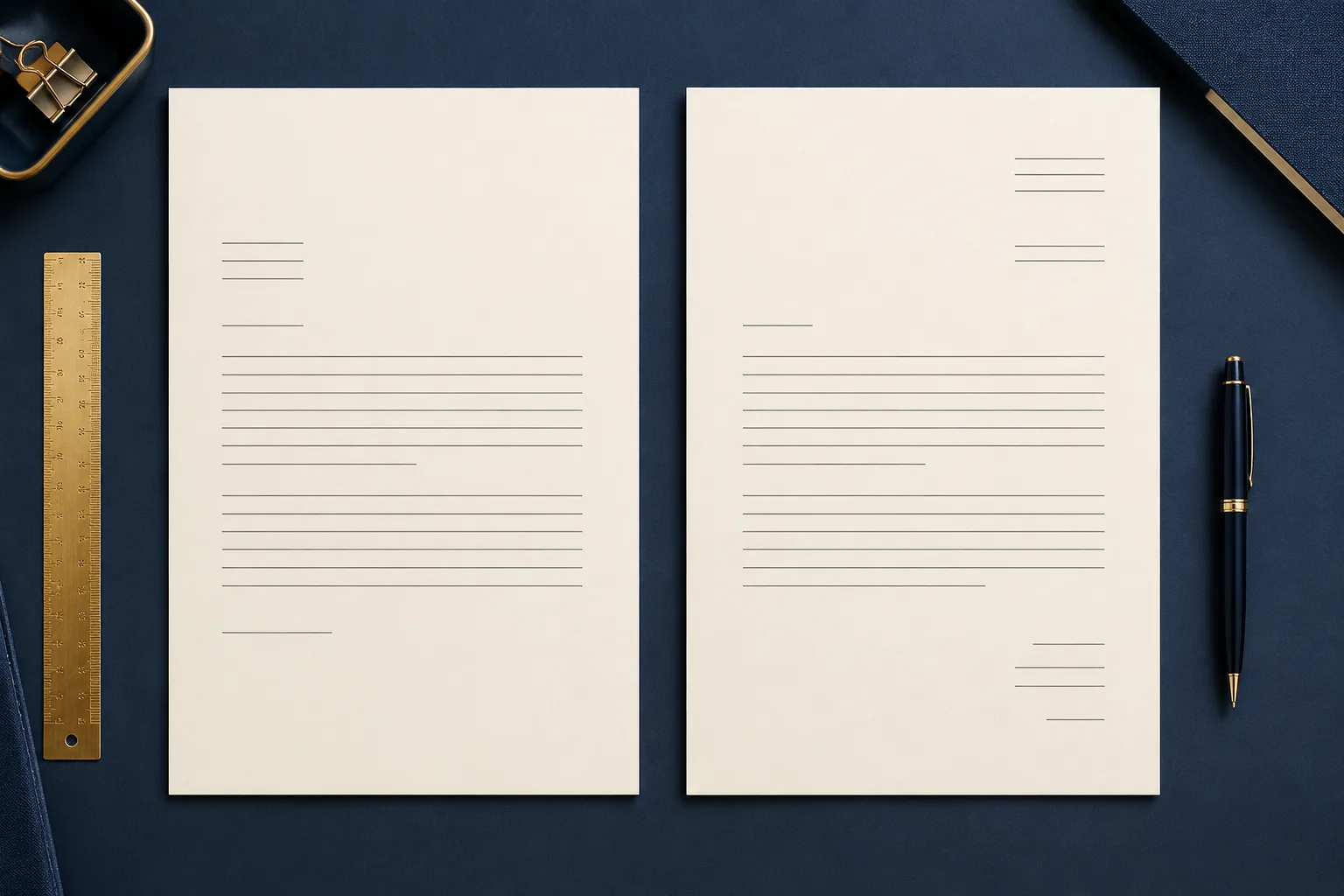
The content and file type can be correct while the layout is still wrong. For formal correspondence, two common layouts are block and modified block format.
Block format
In block format, every major element is aligned to the left, including the sender details, date, recipient address, paragraphs, closing, and name. Paragraphs are not indented.
Block format is usually the safest default because it is simple, readable, and easy to reproduce across different document editors. The Purdue Online Writing Lab identifies block format as the most common business-letter layout and recommends single-spaced, left-aligned paragraphs with a blank line between them.
Modified block format
Modified block uses left-aligned body paragraphs, while the date and closing are positioned toward the center or right side of the page. It can feel more traditional, but it requires more attention to tab stops, alignment, and conversion between editors.
Email-ready format
An email version normally omits full postal-address blocks because the sender and recipient are already identified by the email system. Use:
- A specific subject line
- A greeting
- A direct opening sentence
- Short body paragraphs
- A clear requested action
- A closing and email signature
Do not preserve print-only formatting if it makes the email harder to read.
The essential parts of a professional letter template
A general professional letter template should make space for:
- Sender details: Name, address, phone number, and email when relevant
- Date: The date the final letter is issued
- Recipient details: Name, title, organization, and postal address
- Subject or reference line: A concise identifier, case number, invoice, or topic
- Salutation: The recipient's name or an appropriate general greeting
- Opening: The purpose of the letter
- Body: Necessary context, facts, evidence, or explanation
- Next action: What you want the recipient to do and by when
- Closing: A professional sign-off
- Signature: Handwritten or electronic signature when required, plus the typed name
- Enclosure notation: A list of attachments when useful
Not every letter needs every element. A short thank-you letter may not require a subject line, while a complaint, payment, visa, or administrative letter may need reference numbers and supporting documents.
Copyable blank professional letter template
Use this as a neutral block-format starting point. Replace every bracketed field and remove instructions that do not apply.
[Your Full Name]
[Your Street Address]
[City, State/Province, Postal Code]
[Phone Number]
[Email Address]

[Date]

[Recipient's Full Name]
[Recipient's Job Title]
[Organization Name]
[Street Address]
[City, State/Province, Postal Code]

Subject: [Clear subject or reference number]

Dear [Recipient's Name or Appropriate Title],

I am writing to [state the purpose directly].

[Provide the necessary context, dates, evidence, or explanation. Keep each
paragraph focused on one part of the message.]

[State the requested action, decision, or next step. Include a reasonable
deadline when necessary.]

Thank you for your time and consideration. Please contact me at [phone or
email] if you need additional information.

Sincerely,

[Signature, if required]
[Your Typed Name]
[Your Job Title, if relevant]

Enclosure(s): [List attachments, if any]
This template supplies a structure, not a finished message. Adapt the greeting, tone, evidence, closing, and required fields to the recipient and purpose.
How to customize a downloaded letter template
1. Save a working copy
Do not edit your only blank template. Save a new copy with a meaningful filename so you can return to the original structure later.
2. Replace placeholders systematically
Search for brackets, generic names, sample dates, highlighted fields, and instructional text. Common placeholders include:
[Your Name][Recipient Name][Date][Organization][Reference Number][Amount][Requested Action]
Search the whole document again before exporting. A forgotten placeholder can make an otherwise careful letter appear unreliable.
3. Remove irrelevant example content
Do not keep a sample sentence simply because it sounds professional. Delete invented achievements, legal language, promises, payment terms, or supporting documents that are not true in your situation.
4. Put the purpose in the opening
The first paragraph should tell the recipient why you are writing. Compare:
I am writing regarding the aforementioned matter and would like to bring certain information to your attention.
With:
I am requesting a corrected invoice for order 1042 because the delivery charge was billed twice.
The second version identifies both the document and the requested action.
5. Adjust the tone and details
A template written for a company may sound too formal for a colleague. A friendly template may be unsuitable for a bank, government office, or legal notice. Keep the factual structure while adjusting the level of formality.
If you need help turning your notes into a complete draft, follow our guide to writing a professional letter with AI and then compare the result with the chosen template.
6. Apply consistent formatting
Use one readable font family, consistent font sizes, predictable spacing, and standard alignment. Avoid using multiple decorative fonts, colored backgrounds, or design elements that compete with the message.
7. Add the correct signature method
The required signature depends on the document and recipient. You may need a handwritten signature on a printed letter, a signature image, an electronic signature service, or only a typed name. Do not assume that inserting an image satisfies a legal or organizational signature requirement.
How to download and check the final letter
Use this workflow after editing:
- Proofread the editable version.
- Save the current Word or Google Docs source.
- Export or download the requested final format.
- Reopen the downloaded file—not just the editor preview.
- Inspect every page at normal and zoomed view.
- Test links and confirm the signature is visible.
- Verify the filename and remove accidental comments or tracked changes.
- Send or upload the final file.
- Keep a dated copy of exactly what was submitted.
Microsoft Word and Google Docs both provide official options for downloading or exporting documents to PDF. Conversion is straightforward, but the final file still needs a visual check.
Use a clear filename and version system
Avoid filenames such as letter-final-new-2.pdf. A clear pattern makes the document easier to identify and reduces the risk of sending the wrong version.
Use:
[letter-purpose]-[recipient-or-organization]-[YYYY-MM-DD].[extension]
Examples:
complaint-letter-northfield-supplies-2026-07-31.pdf
resignation-letter-alex-chen-2026-07-31.docx
visa-invitation-letter-maria-lopez-2026-07-31.pdf
Keep drafts in a separate folder or add an explicit version number while collaborating. Remove “draft” from the filename only after the content has been approved.
Download checklist
Before sending a Word or PDF letter, confirm:
Content
- All names, titles, dates, amounts, and reference numbers are correct
- The purpose appears near the beginning
- The requested next step is specific
- Example text and placeholders have been removed
- Mentioned attachments are included
Layout
- Address blocks and dates are aligned consistently
- Paragraphs are short and separated clearly
- No line is cut off and no unexpected blank page appears
- Headers, footers, page numbers, and letterhead display correctly
- The signature does not move to a separate page
File
- The chosen format matches the recipient's instructions
- Comments and tracked changes are removed or intentionally included
- Links work
- The filename is professional
- The document opens on another device or in another viewer
- An editable source and exact final copy are saved
Common letter template mistakes
Choosing by appearance instead of purpose
A visually attractive template cannot replace the correct content. Start with the action the letter must perform, then choose a suitable layout.
Sending an editable file when a final record is needed
If no further editing is expected, PDF usually provides a more stable final presentation. Keep the editable source for your own records.
Converting to PDF too early
Repeatedly editing a converted PDF is less efficient than correcting the source document and exporting again. Finalize the content in Word or Google Docs first.
Leaving hidden editing material
Comments, tracked changes, sample text, document properties, and unused pages may remain in a working file. Review what the recipient will receive, not only what is visible in your current editor view.
Assuming one format works everywhere
Application portals, employers, schools, courts, embassies, and other organizations may provide exact document rules. Their current instructions take priority over general template advice.
Frequently asked questions
What is the best format for a letter template?
Word or Google Docs is usually best while editing; PDF is usually best for a completed letter that will be sent, printed, uploaded, or archived. Use the format specified by the recipient whenever instructions are provided.
Should I send a professional letter as Word or PDF?
Send Word when the recipient needs to edit, comment on, or reuse the document. Send PDF when the content is final and preserving the approved layout matters. Keep the original editable version either way.
Can I edit a PDF letter template?
Some PDF tools allow editing, but a PDF is generally less convenient than the original Word or Google Docs file. Microsoft notes that opening a PDF in Word creates a converted copy and the layout may not exactly match the original. If possible, edit the source document and export a new PDF.
What format should I use for an emailed letter?
Use a PDF attachment when the letter needs a formal page layout or signed record. Paste plain text into the email body when the message is short and no formal attachment is required. Some situations benefit from both a short email and an attached PDF letter.
What should a professional letter template include?
Most professional templates include sender and recipient details, the date, a greeting, an opening statement of purpose, supporting information, a requested next action, a closing, and a signature area. Add a subject, reference number, and enclosure list when relevant.
Do I need to sign a downloaded letter template?
It depends on the recipient and purpose. Some letters accept a typed name, while others require a handwritten, verified electronic, or witnessed signature. Check the relevant instructions before submitting.
How can I tell whether my downloaded PDF is ready?
Open the actual exported file and inspect every page. Confirm that fonts, margins, links, page breaks, attachments, and signatures display correctly, and test the file on another device or PDF viewer when the letter is important.
Choose the format at the end of the workflow
The best letter workflow keeps content and delivery separate: choose a template that fits the purpose, customize it in an editable format, verify every detail, and only then create the final file the recipient expects.
Use Word or Google Docs while people are still revising. Use PDF after the message and layout are approved. Use plain text when the destination is an email body or web form. To get started, browse the editable letter templates by purpose and select the format that fits the final destination.